


If you’ve been trying to organize digital photos the same way you managed files in the early 2000s… by creating folders, subfolders, and manually renaming each one… you’re not alone. For years, this was the only way to keep digital photos organized.
But here’s the truth: folders are an outdated system to organize digital photos.
And the good news? Technology has evolved in a massive (and very helpful) way.
Today, instead of using folders, your photo collection should live inside a photo database like Apple Photos or Google Photos.
If that word “database” feels a little tech-y or intimidating, stick with me. A photo database is simply a smarter, more flexible home for your photos… and it can save you from hours of frustration. Let’s break it down.
what is a photo database?
Think of a database like a huge digital storage box… except it actually knows what’s inside. With folders, you have to manually sort and label everything. But with a database? It sorts for you and helps you find what you need.
A photo database automatically organizes your photos using:
- Metadata (dates, locations, camera info)
- Machine learning (faces, objects, scenes)
- Smart search terms (like “beach,” “birthday,” or “dog”)
This means your photos aren’t just stored, they’re understood. A folder can’t do that.
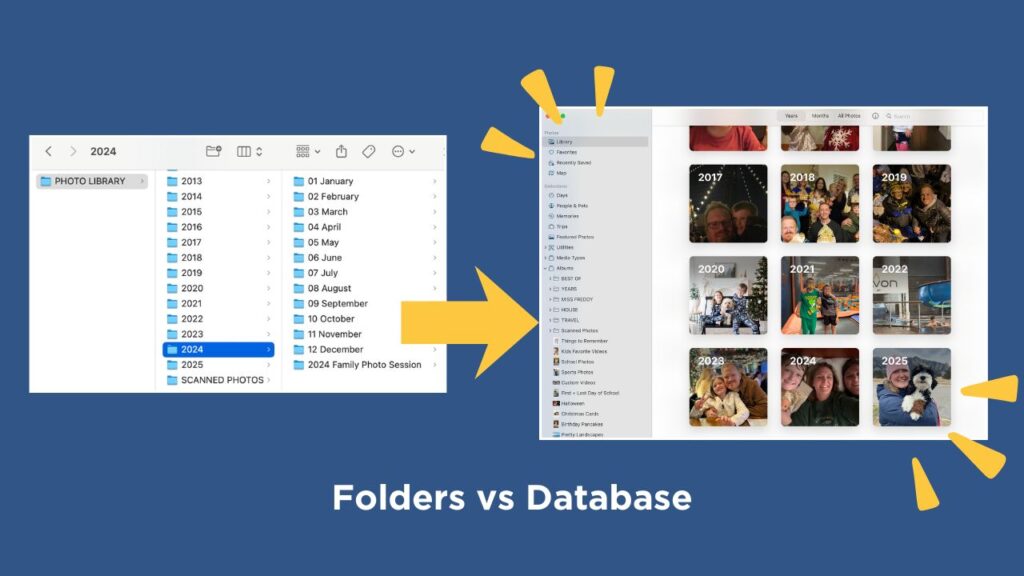
the technology to organize digital photos has evolved (a lot)
Back when digital cameras first arrived, your computer didn’t know that a picture of your kid in front of a cake was a birthday. Or that a blurry golden retriever was your family dog. You had to drag and drop pictures into folders yourself and rename each file with descriptive details.
But in 2025? Your photo library can:
- Recognize the people you love
- Group photos by events, places, or even objects
- Build automatic memories
- Instantly pull up “that one photo from the beach trip in 2014”
Folders could never.
the magic features of photo databases
1. Facial Recognition
Apple Photos and Google Photos can identify faces and group them together automatically.
You name the face once, and the system keeps learning. Imagine being able to instantly pull up every photo of your child from age 2 to 20… without hunting through years of folders. That’s the magic.
2. Smart Search
You can type almost anything into the search bar:
- “Snow”
- “Graduation”
- “Paris”
- “Cake”
- “1978”
And your library will return results… even if you never labeled a thing.
It’s like Google search, but for your actual photos. Oh, and it works in videos too (mind blown)!
3. Albums (without duplicates!)
Here’s where things get even better. Think of albums as the Folders 2.0 when it comes to organizing digital photos. An album is simply a playlist of photos… albums reference the images in your library, but do not make additional copies of those photos.
With folders: if you want a photo of your mom in your “Family” folder and your “Christmas” folder, you have to make a duplicate.
With albums: the photo stays in your library once, and can live in as many albums as you want without taking more space or creating chaos.
This is why switching to albums is life-changing. You can organize by:
- Child
- Travel
- Event
- Sports
- Holidays
- Projects (like photo books!)
- … the options are endless
All without creating a single duplicate file.
4. Memories & Automatic Organization
Both Apple Photos and Google Photos regularly auto-create slideshows of memories like ‘best of 2024’ or ‘Time Spent With Mom’ or ‘Paris Highlights.’
Your photos can finally work for you. It’s so fun!
why you should move away from folders
If you’re still using folders, you’re doing all the work that modern apps can do for you automatically.
A database:
- Saves you time
- Sorts everything chronologically… automatically!
- Helps you find photos instantly
- Eliminates duplicates
- Makes creating photo books infinitely easier
Technology has changed, and your photo-management strategy should change with it. Gone are the days of manually managing everything.
You take thousands of photos a year.
You deserve a system that makes finding and enjoying those photos easy.
Want to organize digital photos but need more step-by-step help?
If you’re ready to switch from “folders and frustration” to a modern, streamlined, searchable photo library, I’ve got a whole course that walks you through it step-by-step… no tech background required!